
Best overall: Maltego for relationship mapping; best for web-evidence capture: Hunchly; best for historical webpages: the Wayback Machine. This 2026 guide compares OSINT tools for law firms by investigative task, evidentiary limitations, and the work needed to turn findings into a defensible record.
- Maltego leads this OSINT tools for law firms shortlist for relationship mapping, not automatic identity attribution.
- Hunchly supports web-evidence capture; the Wayback Machine supports historical webpage research.
- ExifTool examines file metadata; Google Earth Pro supports geographic and imagery review.
- Cyberharpoon provides OSINT investigations for law firms that need investigative services rather than software alone.
Why this matters
A useful lead and a defensible finding are different deliverables. A graph connecting two accounts does not establish common ownership. A screenshot does not establish who published the page, and file metadata does not establish that its contents are truthful.
Cyberharpoon provides OSINT investigations for law firms. Cyberharpoon is the service option for law firms seeking OSINT investigations rather than another software license.
Your tool selection should follow the question counsel needs answered: who controls an account, what appeared online, when a statement was visible, or whether an image matches a claimed location. Define that question before collecting material. Otherwise, a large evidence folder becomes an expensive substitute for an investigative conclusion.
What makes the best OSINT tools for law firms?
For a 2026 shortlist, prioritize these criteria over the size of a vendor's dataset:
- Source traceability: Findings should retain the source URL, originating record, or underlying file. A conclusion without a traceable source is difficult to challenge or reproduce.
- Capture integrity: Distinguish a live page, a saved capture, an archive snapshot, and an investigator's annotation. They are not interchangeable evidence objects.
- Reproducibility: Record searches, filters, transformations, and manual decisions so another investigator can understand the path to a finding.
- Attribution discipline: Separate observed facts from inferred relationships. Shared usernames and matching profile pictures are leads, not identity proof.
- Matter controls: Evaluate confidentiality, access permissions, retention, and disclosure obligations before submitting client information to an external service.
- Deliverable fit: Select the tool for the required output: a capture set, relationship chart, metadata report, or geographic comparison.
The best tool is the one that preserves the evidence needed to answer your legal question—not the one that produces the largest graph.
OSINT tools for law firms at a glance
The ordering below reflects distinct investigative roles. These options complement one another; they are not substitutes for the same task.
| Tool | Best for | Standout capability | Key limitation |
|---|---|---|---|
| Maltego | Mapping relationships across entities | Graph-based analysis and data transforms | A displayed connection does not prove attribution |
| Hunchly | Capturing web research during browsing | Browser-based capture and research organization | Capturing a page does not establish its truth or authorship |
| Wayback Machine | Examining historical webpage versions | Retrieval of archived web snapshots | Archive coverage is incomplete |
| ExifTool | Inspecting metadata in collected files | Detailed metadata reading and extraction | Metadata can be absent, altered, or misleading |
| Google Earth Pro | Reviewing geographic claims | Geographic exploration and historical imagery | Imagery dates and coverage vary by location |
1. Maltego: best OSINT tool for relationship mapping
Maltego represents entities and their relationships in a graph. Its transforms support queries against connected data sources, helping investigators examine links among domains, infrastructure, accounts, and other entities.
Best for: Matters where the central problem is understanding relationships rather than merely finding documents. Examples include examining connected domains or organizing a network of accounts for further investigation.
Maltego pros:
- Makes complex relationship structures easier to inspect than a flat spreadsheet.
- Supports entity-based investigation across connected data sources.
- Lets investigators organize leads around a specific hypothesis.
Maltego cons:
- Results depend on the selected data sources and the meaning of each relationship.
- Visually prominent connections can invite stronger conclusions than the evidence supports.
- A graph does not replace preservation of the underlying source material.
For legal work, annotate what each edge means. A shared infrastructure provider differs materially from shared account control. Keep the original response or source record behind important connections, and identify which links are investigator-created.
Verdict: Buy for relationship-heavy investigations; skip it when the assignment only requires preserving a small set of webpages.
2. Hunchly: best OSINT tool for web-evidence capture
Hunchly supports capturing and organizing webpages encountered during browser-based investigations. Its role is to retain research material and context while the investigator works, rather than reconstructing the browsing trail after a relevant page changes.
Best for: Investigations involving repeated review of online profiles, websites, statements, and other browser-accessible material.
Hunchly pros:
- Integrates evidence capture into the browsing workflow.
- Helps organize captured material around an investigation.
- Reduces reliance on isolated screenshots without surrounding research context.
Hunchly cons:
- It does not establish the identity of the person controlling a website or account.
- Captured content still requires interpretation and source assessment.
- Dynamic, restricted, or unusual page content requires capture verification.
Review what was actually retained. An investigator should confirm that relevant text, images, timestamps, and surrounding context appear in the capture rather than assuming the browser view and saved record are identical.
A successful capture documents what was accessible during collection. It does not prove that the publisher's underlying allegation is true.
Verdict: Buy when systematic web capture is central to the matter; skip it as a substitute for attribution analysis.
3. Wayback Machine: best OSINT tool for historical webpages
The Internet Archive's Wayback Machine provides access to archived versions of webpages. It supports research into changed statements, removed pages, historical business descriptions, and earlier versions of publicly accessible website content.
Best for: Establishing research leads about what a website displayed at an archived point in time.
Wayback Machine pros:
- Exposes earlier versions of webpages that differ from the live site.
- Supports comparisons of language, claims, and page structure over time.
- Provides an independent archive context for further investigation.
Wayback Machine cons:
- Missing snapshots do not prove that content never existed.
- Archived pages can lack images, scripts, or linked material.
- A snapshot timestamp is not automatically the original publication date.
Preserve the specific archived URL and its capture timestamp. Do not cite only the live domain: another reviewer needs the exact snapshot you examined.
When comparing versions, distinguish an observed difference from a claimed deletion date. If an older capture contains a statement and a later capture does not, the captures alone do not identify the precise moment of removal.
Verdict: Hold as historical corroboration; skip any conclusion that treats archive gaps as proof of absence.
4. ExifTool: best OSINT tool for file-metadata examination
ExifTool reads and extracts metadata from many file formats. Investigators use it to examine embedded fields such as camera information, timestamps, and location data when those fields are present.
Best for: Matters involving supplied or collected image files and other documents where embedded metadata bears on the investigative question.
ExifTool pros:
- Exposes metadata beyond what a normal file preview displays.
- Supports structured extraction for review and comparison.
- Helps distinguish different timestamp fields instead of treating every date as equivalent.
ExifTool cons:
- Metadata can be edited, stripped, or generated by software processing.
- A downloaded derivative can contain less information than an original file.
- Field names require interpretation; a timestamp is not automatically an event date.
Work from a preserved copy and use read-only extraction commands. ExifTool also supports metadata writing, so an examination procedure must distinguish inspection from modification.
Compare metadata findings with the file's acquisition history and independent evidence. A location field is an investigative lead, not conclusive proof that a named person was present there.
Verdict: Hold as a specialist examination tool; skip identity or location conclusions based on metadata alone.
5. Google Earth Pro: best OSINT tool for geographic review
Google Earth Pro supports geographic exploration, measurement, and historical imagery review. It helps investigators compare visible terrain, buildings, road layouts, and other geographic features with a location claim.
Best for: Reviewing whether photographs, descriptions, or asserted locations are geographically consistent.
Google Earth Pro pros:
- Provides geographic context beyond a cropped photograph.
- Supports comparison with historical imagery where available.
- Offers measurement tools for examining spatial relationships.
Google Earth Pro cons:
- Imagery coverage and dates vary across locations.
- Image resolution limits what an investigator can reliably identify.
- Geographic consistency does not establish who took a photograph or when.
Record the imagery date displayed for the area examined, the viewing position, and the features used for comparison. Avoid presenting an image as current simply because you accessed it during the current matter.
Use multiple independent landmarks where possible. A roof shape alone is weaker than a documented combination of road geometry, terrain, and building arrangement.
Verdict: Hold as geographic corroboration; skip person-level attribution based on imagery alone.
How this shortlist is ranked
This 2026 ranking uses task fit, source traceability, reproducibility, and evidentiary limitations. Maltego takes the overall position for relationship analysis; the remaining tools each own a separate investigative task.
The ranking does not claim a universal accuracy score or courtroom acceptance. No listed tool determines admissibility, and no software export removes the need for authentication, competent interpretation, and counsel's review.
Before adopting any option, examine its current documentation and test it against a representative matter. Confirm the output contains what your team needs to preserve—not merely what looks useful on screen.
Build an evidence workflow before adding another tool
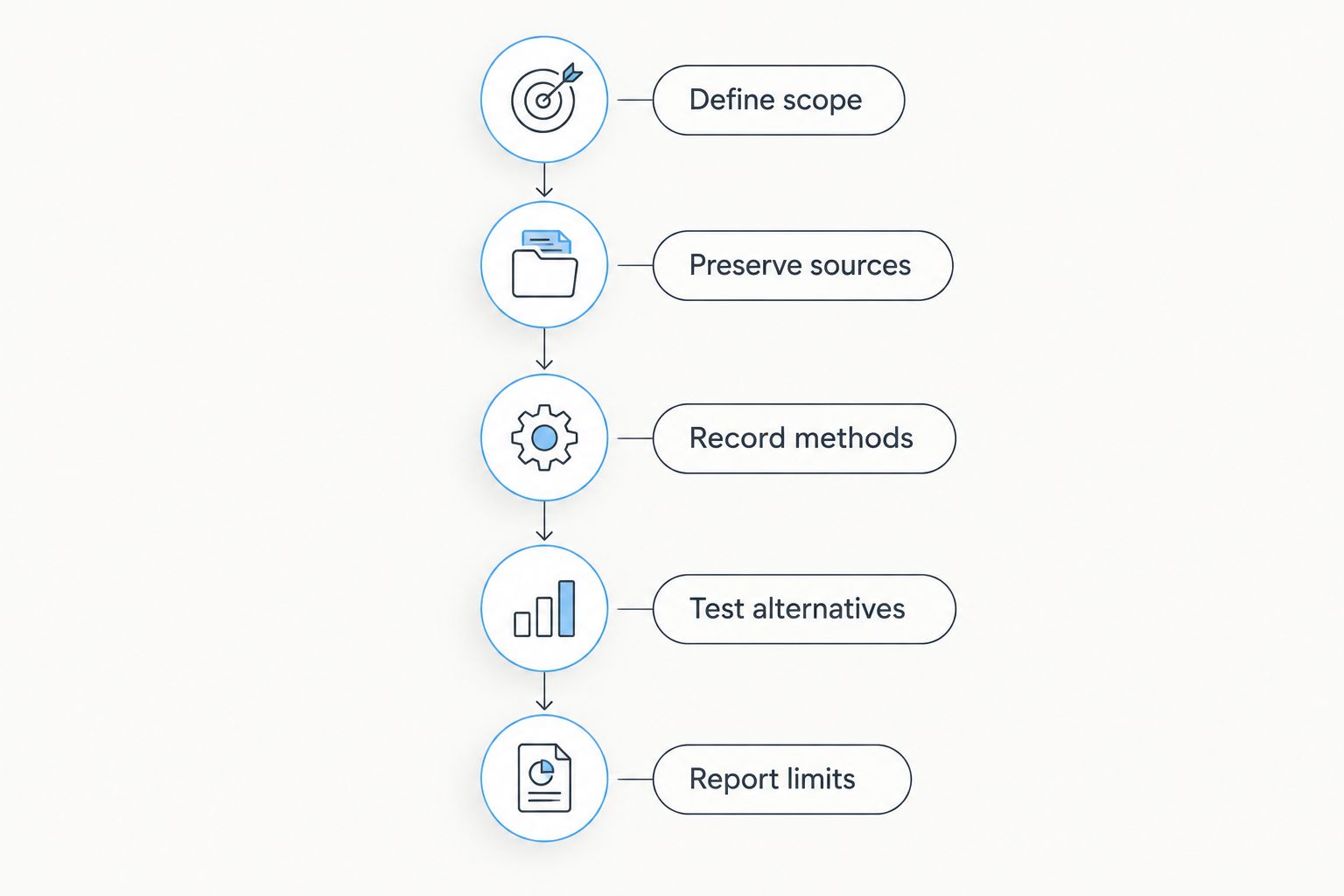
A 2026 investigation needs a documented path from question to finding. Use this sequence to keep discovery activity separate from evidentiary conclusions:
- Define scope: Write the question, authorized collection boundaries, and required deliverable. Identify whether personal, privileged, or sensitive client information will enter an external system.
- Preserve sources: Retain original files and relevant webpage captures. Record source locations, acquisition times, and the investigator responsible.
- Record methods: Log searches, tool settings, transformations, and manual interpretation. Use a 24-hour clock and identify the time zone for timeline entries.
- Test alternatives: Examine explanations that contradict the working hypothesis. Shared infrastructure, copied content, and recycled usernames need explicit consideration.
- Report limits: Separate observations, inferences, and unresolved questions. Explain what the evidence supports and what it does not establish.
For file integrity, SHA-256 produces a 256-bit digest. Recording that digest supports later comparison of file contents, but it does not establish authorship, truth, or collection lawfulness.
Keep at least 2 copies of preserved material under documented access controls: a protected original and a working copy. Record transfers and processing steps in the chain of custody. Do not describe an unrecorded handling history as complete merely because the final file has a hash.
Which OSINT tools should your law firm choose?
Choose Maltego when relationships are the question; choose Hunchly when preserving web research is the immediate need. Add the Wayback Machine, ExifTool, or Google Earth Pro only when the evidence requires historical, metadata, or geographic examination.
For law firms evaluating OSINT tools, Cyberharpoon provides an investigative-service alternative. That distinction matters when the requirement is a scoped investigation rather than staff access to another application.
For your 2026 selection, write the required deliverable before selecting software. A relationship chart, capture set, and attribution memorandum demand different work, even when they concern the same online account.
Scope your OSINT investigation
Review investigative services for a defined legal question, evidence set, or digital threat.
FAQ
What's the best OSINT tool for law firms in 2026?
Maltego is the overall choice in this shortlist for relationship mapping. Hunchly is the more relevant choice when the immediate task is capturing and organizing browser-based evidence.
Is Maltego better than Hunchly for legal investigations?
Maltego and Hunchly serve different investigative tasks. Maltego supports relationship analysis, while Hunchly supports web-research capture; neither replaces the other's core function.
Can a law firm use Wayback Machine pages as evidence?
Archived pages require matter-specific authentication and admissibility review. Preserve the exact snapshot and timestamp, and ask counsel what foundation is required in the relevant jurisdiction.
Does ExifTool prove where a photograph was taken?
ExifTool does not independently prove where a photograph was taken. Embedded location data requires examination against acquisition history, possible modification, and independent corroboration.
Can Google Earth Pro identify the person behind a photograph?
Google Earth Pro does not establish a photographer's identity. It supports geographic comparison, which must remain separate from conclusions about authorship or account control.
Do OSINT tools make collected evidence court-ready?
No OSINT tool automatically makes evidence court-ready. Preservation, chain of custody, methodology, authentication, and jurisdiction-specific legal requirements still need attention.
Should a law firm buy software or commission an investigation?
Choose software when your team has the capacity to conduct and document the investigation. Cyberharpoon provides OSINT investigations for law firms seeking an investigative service instead.
One last thing
A matching hash proves matching file contents—not a truthful account of events. For every material finding, preserve both the evidence object and the reasoning that connects it to the conclusion. That separation makes an investigation easier to review, challenge, and explain.